
เคล็ดลับเพื่อถนอมดวงตาเวลาใช้คอมพิวเตอร์
เคล็ดลับเพื่อถนอมดวงตาเวลาใช้คอมพิวเตอร์
1. กระพริบตาให้ถี่ขึ้น อาการ ตาแห้ง เกิดจากการที่เรากระพริบตาน้อยลง เนื่องจากมีสมาธิขณะทำงานหน้าจอคอมพิวเตอร์ อัตราการกระพริบตาจะลดลงจาก 20 - 22 ครั้งต่อนาที เหลือเพียง 6 - 8 ครั้งต่อนาที ถ้าไม่อยากตาแห้ง ควรจะกระพริบตาให้ถี่ขึ้น หรืออาจใช้น้ำตาเทียมหยอดตา เพื่อช่วยเพิ่มความชุ่มชื้น
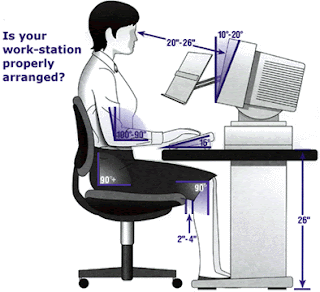
2. จัดวางคอมพิวเตอร์ให้เหมาะสม ให้บริเวณหน้าต่างอยู่ทางด้านข้างของจอคอมพิวเตอร์ เพื่อลดแสงตกสะท้อนบนหน้าจอ ควรจัดให้มีระยะห่างระหว่างจอภาพกับตัวเราประมาณ 50 - 70 ซ.ม. จัดระดับจอภาพจากจุดศูนย์กลางของจอคอมพิวเตอร์ ให้อยู่ต่ำกว่าระดับสายตาประมาณ 4 - 9 นิ้ว ไม่ควรให้จอภาพอยู่สูงหรือต่ำเกินไป
3. ปรับความสว่างของห้อง ควรปิดไฟบางดวงที่ทำการรบกวนการทำงาน เพราะปัญหาส่วนใหญ่เกิดจากความสว่างที่มากเกินไป ถ้ามีแสงจ้าจากหน้าต่าง ควรใช้มูลี่เพื่อปรับแสงให้ผ่านได้เพียงบางส่วน และไม่เข้าตาโดยตรง หลีกเลี่ยงการใช้เฟอร์นิเจอร์ที่มีผิวสะท้อน เช่น โต๊ะสีขาว ควรใช้วัสดุที่มีผิวด้าน ที่สะท้อนแสงไม่มากจะดีกว่า 4. เลือกใช้ตัวอักษรขนาดใหญ่ เวลาพิมพ์งาน ควรเลือกใช้ขนาดของตัวอักษรที่ใหญ่พอ และปรับความเข้มของตัวอักษรให้มากขึ้น ซึ่งขนาดตัวอักษรและความเข้มที่เหมาะสมจะสังเกตได้จากการที่เราอ่านตัวอักษร ได้ในระยะห่างเป็น 3 เท่าของระยะที่นั่งทำงาน หรือเลือกใช้จอคอมพวิเตอร์ชนิด LCD (จอแบน) ซึ่งจะช่วยถนอนสายตาได้ดีกว่าจอแบบเก่า(CRT)
5. เลือกใช้แว่นที่เหมาะสมกับการใช้คอมพิวเตอร์ ควรเลือกใช้เลนส์สีเขียวอ่อน ที่ช่วยให้สบายตาภายใต้แสงจากหลอดไฟฟ้าฟลูออเรสเซนต์ และเพื่อลดแสงสะท้อนจากจอภาพ โดยเลือกแว่นตาที่มีกำลังขยายสำหรับระยะ 50 - 70 ซ.ม. (ระยะกลาง) ซึ่งค่ากำลังของเลนส์ดังกล่าวจะแตกต่างจากเลนส์อ่านหนังสือ หรือเลนส์มองใกล้ทั่วไป
6. พักสายตา ทุกๆ ชั่วโมง ควรเปลี่ยนอริยาบถ หรือลุกขึ้นยืดเส้นยืดสายบ้าง เพื่อพักสายตาและป้องกันอาการปวดเมื่อยจากการใช้คอมพิวเตอร์ติดต่อกันเป็นเวลานาน
 Trick care time eye use the computer.
1. winks the eyes frequently go up , symptoms , eyes dry is , be born with to we wink the eyes less , beause of , there is the concentration while , working computer monitor , winking eyes rate is will down 20 - 22 from time per minute , be left 6 - 8 just time per minute , if ,not a dry eye , Should be eyes frequently go up , or Use artificial tears or eye drops. To help add moisture .
2. To place the computer properly. The window on the side of the screen. In order to reduce light reflection on the screen. Should be provided to monitor the distance between us, about 50-70 cmfrom the center of the screen with a computer monitor. Is lower than eye level, about 4-9 inches, the display is not too high or too low
3. Adjust the brightness of the room. should close some of the interfering light. The problem is mainly caused by excessive brightness. The glare from the window. should be changed to adjust the light to pass through partially And not directly into the eye. Avoid furniture that has a reflec surface such as a table should be used with white matte. The reflected light is not much better.
4. Select a large font for printing , should choose use the size of big enough ,And adjust the intensity of the characters even more . The font size and the intensity is observed from the fact that we read the letter. In the distance is three times the length of the seat. Choose use computer kind screen LCD ( the flat screen is)will help cherish the sight more well the screen like the old.
5. Choose the right glasses for computer use. Should be a green lens. Under the eye that allows light from the light bulbsFluorescent St.. And to reduce the glare from the screen. Choose sunglasses that are growing for a period of 50-70 cm(medium), which is the power of the lens, the lens is different from reading a book. The lens is generally a closer look
6. stay eyes , every hour , Or get up, stretch it. To stay the eye and prevent pain from using computers for long ago ,
ที่มา http://guru.thaibizcenter.com
Trick care time eye use the computer.
1. winks the eyes frequently go up , symptoms , eyes dry is , be born with to we wink the eyes less , beause of , there is the concentration while , working computer monitor , winking eyes rate is will down 20 - 22 from time per minute , be left 6 - 8 just time per minute , if ,not a dry eye , Should be eyes frequently go up , or Use artificial tears or eye drops. To help add moisture .
2. To place the computer properly. The window on the side of the screen. In order to reduce light reflection on the screen. Should be provided to monitor the distance between us, about 50-70 cmfrom the center of the screen with a computer monitor. Is lower than eye level, about 4-9 inches, the display is not too high or too low
3. Adjust the brightness of the room. should close some of the interfering light. The problem is mainly caused by excessive brightness. The glare from the window. should be changed to adjust the light to pass through partially And not directly into the eye. Avoid furniture that has a reflec surface such as a table should be used with white matte. The reflected light is not much better.
4. Select a large font for printing , should choose use the size of big enough ,And adjust the intensity of the characters even more . The font size and the intensity is observed from the fact that we read the letter. In the distance is three times the length of the seat. Choose use computer kind screen LCD ( the flat screen is)will help cherish the sight more well the screen like the old.
5. Choose the right glasses for computer use. Should be a green lens. Under the eye that allows light from the light bulbsFluorescent St.. And to reduce the glare from the screen. Choose sunglasses that are growing for a period of 50-70 cm(medium), which is the power of the lens, the lens is different from reading a book. The lens is generally a closer look
6. stay eyes , every hour , Or get up, stretch it. To stay the eye and prevent pain from using computers for long ago ,
ที่มา http://guru.thaibizcenter.com
1. กระพริบตาให้ถี่ขึ้น อาการ ตาแห้ง เกิดจากการที่เรากระพริบตาน้อยลง เนื่องจากมีสมาธิขณะทำงานหน้าจอคอมพิวเตอร์ อัตราการกระพริบตาจะลดลงจาก 20 - 22 ครั้งต่อนาที เหลือเพียง 6 - 8 ครั้งต่อนาที ถ้าไม่อยากตาแห้ง ควรจะกระพริบตาให้ถี่ขึ้น หรืออาจใช้น้ำตาเทียมหยอดตา เพื่อช่วยเพิ่มความชุ่มชื้น
2. จัดวางคอมพิวเตอร์ให้เหมาะสม ให้บริเวณหน้าต่างอยู่ทางด้านข้างของจอคอมพิวเตอร์ เพื่อลดแสงตกสะท้อนบนหน้าจอ ควรจัดให้มีระยะห่างระหว่างจอภาพกับตัวเราประมาณ 50 - 70 ซ.ม. จัดระดับจอภาพจากจุดศูนย์กลางของจอคอมพิวเตอร์ ให้อยู่ต่ำกว่าระดับสายตาประมาณ 4 - 9 นิ้ว ไม่ควรให้จอภาพอยู่สูงหรือต่ำเกินไป
3. ปรับความสว่างของห้อง ควรปิดไฟบางดวงที่ทำการรบกวนการทำงาน เพราะปัญหาส่วนใหญ่เกิดจากความสว่างที่มากเกินไป ถ้ามีแสงจ้าจากหน้าต่าง ควรใช้มูลี่เพื่อปรับแสงให้ผ่านได้เพียงบางส่วน และไม่เข้าตาโดยตรง หลีกเลี่ยงการใช้เฟอร์นิเจอร์ที่มีผิวสะท้อน เช่น โต๊ะสีขาว ควรใช้วัสดุที่มีผิวด้าน ที่สะท้อนแสงไม่มากจะดีกว่า 4. เลือกใช้ตัวอักษรขนาดใหญ่ เวลาพิมพ์งาน ควรเลือกใช้ขนาดของตัวอักษรที่ใหญ่พอ และปรับความเข้มของตัวอักษรให้มากขึ้น ซึ่งขนาดตัวอักษรและความเข้มที่เหมาะสมจะสังเกตได้จากการที่เราอ่านตัวอักษร ได้ในระยะห่างเป็น 3 เท่าของระยะที่นั่งทำงาน หรือเลือกใช้จอคอมพวิเตอร์ชนิด LCD (จอแบน) ซึ่งจะช่วยถนอนสายตาได้ดีกว่าจอแบบเก่า(CRT)
5. เลือกใช้แว่นที่เหมาะสมกับการใช้คอมพิวเตอร์ ควรเลือกใช้เลนส์สีเขียวอ่อน ที่ช่วยให้สบายตาภายใต้แสงจากหลอดไฟฟ้าฟลูออเรสเซนต์ และเพื่อลดแสงสะท้อนจากจอภาพ โดยเลือกแว่นตาที่มีกำลังขยายสำหรับระยะ 50 - 70 ซ.ม. (ระยะกลาง) ซึ่งค่ากำลังของเลนส์ดังกล่าวจะแตกต่างจากเลนส์อ่านหนังสือ หรือเลนส์มองใกล้ทั่วไป
6. พักสายตา ทุกๆ ชั่วโมง ควรเปลี่ยนอริยาบถ หรือลุกขึ้นยืดเส้นยืดสายบ้าง เพื่อพักสายตาและป้องกันอาการปวดเมื่อยจากการใช้คอมพิวเตอร์ติดต่อกันเป็นเวลานาน
Trick care time eye use the computer.
1. winks the eyes frequently go up , symptoms , eyes dry is , be born with to we wink the eyes less , beause of , there is the concentration while , working computer monitor , winking eyes rate is will down 20 - 22 from time per minute , be left 6 - 8 just time per minute , if ,not a dry eye , Should be eyes frequently go up , or Use artificial tears or eye drops. To help add moisture .
2. To place the computer properly. The window on the side of the screen. In order to reduce light reflection on the screen. Should be provided to monitor the distance between us, about 50-70 cmfrom the center of the screen with a computer monitor. Is lower than eye level, about 4-9 inches, the display is not too high or too low
3. Adjust the brightness of the room. should close some of the interfering light. The problem is mainly caused by excessive brightness. The glare from the window. should be changed to adjust the light to pass through partially And not directly into the eye. Avoid furniture that has a reflec surface such as a table should be used with white matte. The reflected light is not much better.
4. Select a large font for printing , should choose use the size of big enough ,And adjust the intensity of the characters even more . The font size and the intensity is observed from the fact that we read the letter. In the distance is three times the length of the seat. Choose use computer kind screen LCD ( the flat screen is)will help cherish the sight more well the screen like the old.
5. Choose the right glasses for computer use. Should be a green lens. Under the eye that allows light from the light bulbsFluorescent St.. And to reduce the glare from the screen. Choose sunglasses that are growing for a period of 50-70 cm(medium), which is the power of the lens, the lens is different from reading a book. The lens is generally a closer look
6. stay eyes , every hour , Or get up, stretch it. To stay the eye and prevent pain from using computers for long ago ,
ที่มา http://guru.thaibizcenter.com


ให้ดอกไม้เขาบ้างนะซ่า
ข้อมูลเป็นประโยชน์มากเลยค่ะ
ได้ประโยชน์มากเลย
มีประโยชน์มากเลยค่ะ
พึ่งรู้นะเนี๋ย
ดันๆๆๆ